YouTube Comment Picker & Giveaway Generator
Pick a random winner from any YouTube video, Shorts or community post comment section. Filter duplicate entries, require a hashtag, and prove the draw was fair — free for giveaways up to 100 entries, with no account.
- No login or API key
- Shorts & posts
- Duplicate filter
- Verifiable draw proof
Step by step
How the random comment picker works
Three steps, about two minutes, and nothing to install. Every giveaway follows the same path whether the video has forty comments or forty thousand.
- 1
Paste your YouTube video, Shorts or post link
Copy the URL of the video, Short or community post running your giveaway and paste it into the box at the top of the page. Nothing is installed and no account is created.
- 2
Set your entry filters
Choose the rules your giveaway advertised: one entry per channel, top-level comments only, a required keyword or hashtag such as #giveaway, and any channels you want blocked. The entry count updates live so you can see exactly how many people qualify.
- 3
Pick your random winner
Hit Pick Winner. The draw runs on our server with a cryptographic random number generator, and the result comes back signed — so the proof you publish alongside the winner was issued by something neither you nor anyone watching can edit.
Why creators trust it
A YouTube giveaway picker built to be checked
Anyone can claim a draw was random. These are the parts that let your audience confirm that this random YouTube comment picker actually is one.
100% random and unbiased
Winners are drawn with the Web Crypto API using rejection sampling, so every eligible comment has exactly the same chance. No weighting by likes, recency, or anything else.
YouTube Shorts and community post support
Shorts comment sections work exactly like standard videos. Paste a /shorts/ link and the comments load the same way — no separate tool, no different workflow.
Duplicate filter built in
Spam-commenting to farm entries is the oldest trick in giveaways. One entry per channel is on by default, so posting fifty comments gets someone exactly one shot.
Backup winners in one draw
Draw as many winners as you need in a single pass — no channel can be picked twice. The runners-up are listed in order, ready for when your first pick never replies.
Proof you can publish
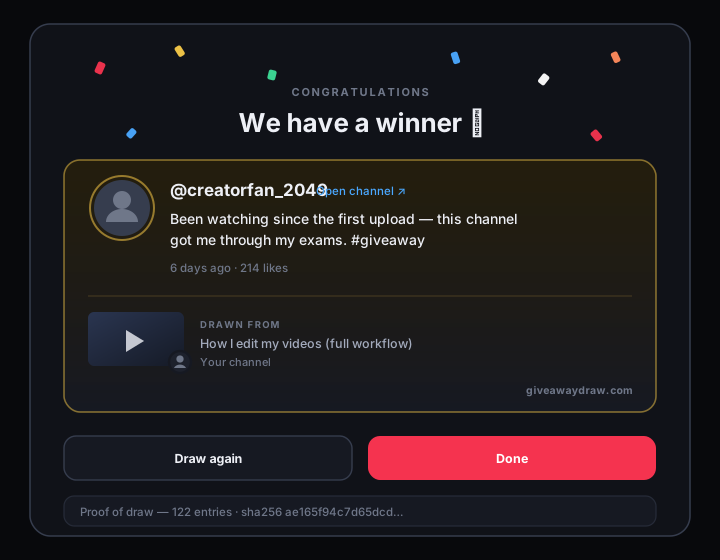
Every draw produces a SHA-256 hash of the exact entry pool plus a timestamp. Post it with your announcement and viewers can verify the pool was never edited after the fact.
Free, with no account
Load any comment section and draw from up to 100 entries without signing up or handing over an email address. Larger draws are a one-off upgrade, not a subscription.
Shorts
YouTube Shorts comment picker support
If you came looking for a YouTube comment picker Shorts creators can actually use, this is the same tool — there is no separate Shorts mode to switch into. Shorts run on the same comment infrastructure as long-form videos, though plenty of pickers still choke on the URL format.
Link formats that work
youtube.com/shorts/VIDEO_IDyoutube.com/post/POST_IDyoutube.com/watch?v=VIDEO_IDyoutu.be/VIDEO_IDyoutube.com/live/VIDEO_IDyoutube.com/embed/VIDEO_IDA bare 11-character video ID
What to watch for on Shorts
Shorts attract far more single-word comments than long-form videos, which makes the duplicate filter and a required hashtag much more useful. If your Short went viral, expect the eligible-entry count to be a fraction of the raw comment count once “one entry per channel” has run — that is the filter working, not a bug.
Shorts comment sections also grow fast in the first hours. Load them again right before you draw so late entries are included.
Stay compliant
Official YouTube contest rules checklist
A YouTube contest winner generator only solves the last five minutes of a giveaway. YouTube publishes its own contest policies, and breaking them can cost you the video or the channel. This is the working checklist — the full policy is worth reading before your first giveaway.
Follow the law and YouTube’s own policies
Your contest must comply with all applicable laws and regulations where your entrants live, and with YouTube’s Terms of Service and Community Guidelines. Anything that would be prohibited on YouTube generally is also prohibited as a contest mechanic.
You are the sponsor, not YouTube
YouTube must not be a sponsor of your contest. State clearly that YouTube does not sponsor, endorse, or administer your giveaway, and that entrants release YouTube from any liability connected to it.
Publish complete official rules
Contests need visible official rules covering eligibility, entry method, the entry period with a firm closing date and time zone, prize description and value, how the winner is selected, and how they will be notified.
Do not require excessive engagement
Contests cannot require entrants to do things that inflate metrics artificially. Watch time, likes, and subscriptions must not be bought with entries in ways that violate YouTube’s fake-engagement policy.
Never collect more data than you need
Only ask for the information you actually need to deliver the prize, and only after someone has won. Asking for addresses or phone numbers in a public comment thread exposes your viewers and creates a liability for you.
Respect prize restrictions
Prizes must not be alcohol, tobacco, drugs, weapons, adult material, or anything else restricted for the audience. If your video is made for kids, extra restrictions apply and the safest answer is not to run a contest on it at all.
Announce the winner publicly
Post the result where entrants can see it — a pinned comment, a community post, or a follow-up video. Publishing the entry count and your proof-of-draw hash alongside it ends most accusations before they start.
Draw at a fixed, announced moment
Decide the closing time in advance and draw once. Re-rolling because you did not like the winner is the single fastest way to lose your audience’s trust, and it is visible to anyone who saved the earlier announcement.
Want the long version? Read the full guide to YouTube contest policies. GiveawayDraw is not a law firm, and a giveaway with a meaningful prize pool deserves proper advice in your own jurisdiction.
FAQ
Frequently asked questions
The questions creators actually send us, answered without the sales pitch.
Is this YouTube comment picker free?
Yes. Loading comments is unlimited and free, and you can draw a winner from up to 100 eligible entries without an account, an email address, or a payment method. Giveaways with more than 100 eligible entries need a one-off Pro upgrade, and you always see your real entry count before deciding.
Does the comment picker work on YouTube Shorts?
Yes. Paste any youtube.com/shorts/ link and the Shorts comment section loads exactly like a standard video. Regular watch links, youtu.be short links, live replay links, embed links, and bare 11-character video IDs are all accepted too.
Can I pick a winner from a YouTube community post?
Yes. Paste a youtube.com/post/ link and the post’s comments load exactly like a video’s, replies included. Plenty of giveaways run on a community post rather than a video, so the picker treats both the same way.
How does the duplicate comment filter work?
Every comment carries the channel ID of its author. With “one entry per channel” enabled, the picker keeps only the first eligible comment from each channel ID and discards the rest, so someone commenting fifty times still gets a single entry. It runs after your keyword and blocklist filters, so a channel keeps its first qualifying comment rather than its first comment overall.
Is the winner really chosen at random?
Yes. The draw uses a cryptographic random number generator with rejection sampling, which removes the small bias that the common “random number modulo list length” approach introduces. Likes, reply counts, comment age, and position in the list have no effect whatsoever on the odds. It runs on our server rather than in your browser, and the receipt is signed there, so the proof cannot be edited by whoever ran the giveaway.
Can I prove to my viewers that the draw was fair?
Every draw generates a proof containing the timestamp, the entry count, and a SHA-256 hash of the exact pool of entries. Publish that hash with your winner announcement: anyone who reloads the same video with the same filters can recompute it and confirm the pool was not edited after the draw.
Do I need a YouTube API key or to log in?
No. There is nothing to install, no API key to generate in Google Cloud, no OAuth screen, and no permission to grant. Paste a public video link and the comments load. The tool never asks for access to your channel and cannot post, edit, or delete anything.
How many comments can it load?
The loader pages through the entire comment section, including very large ones, and shows a live count as it goes. You can stop early at any point and draw from what has loaded. Results are cached briefly on our side, so drawing again does not re-download the comments.
Can I pick more than one winner?
Yes. Set the number of winners before drawing and the picker selects that many distinct entries in one pass — no channel can be drawn twice. The runners-up are listed in order, which makes them ready-made backup winners if your first pick never replies.
Can I filter entries by a hashtag or keyword?
Yes. Enter any word, phrase, or hashtag such as #giveaway in the keyword box and only comments containing it stay eligible. Matching is case-insensitive and looks anywhere in the comment, so “#Giveaway” and “#giveaway” both qualify.
Why is my entry count lower than the comment count?
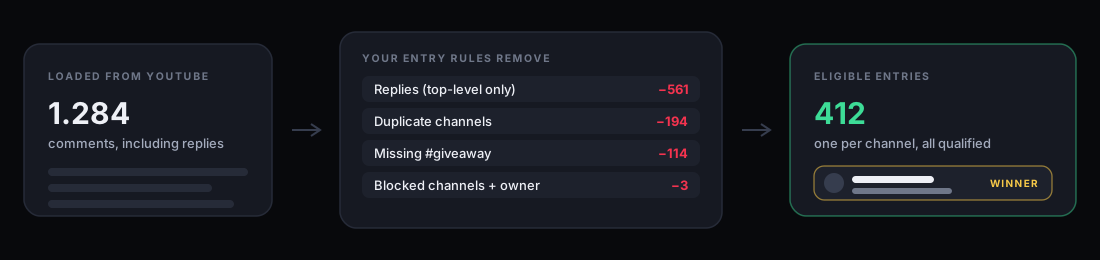
Your filters are doing their job. The panel under the input breaks down exactly what was removed — replies, duplicate channels, keyword mismatches, blocked channels, and the channel owner — so you can see which rule accounts for the difference and adjust it before drawing.
Ready to draw your winner?
Paste your video link, set your rules, and pick a winner your audience can verify — free for giveaways up to 100 entries.
Open the comment picker